

photos, slides & Negatives

Preserve boxes of family photos without shipping them away.
Professional photo, slide, and negative scanning done locally in Birmingham using advanced scanning equipment, flexible packages, and careful hands-on service.
Digitize boxes of family photos,
32¢ each & upOur bulk photo scanning specials are designed for customers who want an affordable way to preserve large collections of loose printed photos.
500 Photo Bulk Box
Great for smaller boxes of loose family photos.
- 500 loose photos
- Photos must be removed from albums
- Simple budget-friendly scanning
Equivalent to as low as 55¢ per scan.
1,000 Photo Bulk Box
Ideal for medium to large family collections.
- 1,000 loose photos
- Budget bulk scanning
- Great for family archives
- Local Birmingham processing
Equivalent to as low as 50¢ per scan.
2,000 Photo Bulk Box
Ideal for medium to large family collections.
- 2,000 loose photos
- Budget bulk scanning
- Great for family archives
- Local Birmingham processing
Equivalent to as low as 40¢ per scan.
5,000 Photo Bulk Box
Best value for large photo collections and estate projects.
- 5,000 loose photos
- Best bulk value
- Great for multi-generation collections
- Perfect for long-term preservation
Equivalent to as low as 32¢ per scan.
Advanced Enhancement
For customers who want their scanned images to look even better, we offer advanced enhancement and custom color correction services.
- Custom color correction available
- Improved brightness and contrast
- Image cleanup and enhancement
- Great for faded or discolored prints
- Quoted based on project needs
Custom & Fragile Scanning
Need to scan large artwork, oversized prints, delicate photos, or fragile materials? We can review specialty projects in person.
- Large artwork and oversized prints
- Fragile or delicate materials
- Album pages and specialty items
- Careful hands-on handling
- Priced after project review
Your memories deserve more than a box in the closet.
Printed photos fade, albums break down, and boxes can be damaged or misplaced. Digital scanning makes it easier to protect, organize, share, and enjoy your family history.
Before you mail irreplaceable photos away, bring them to a local Birmingham team you can talk to in person.
Bring them in. We’ll help you choose the right option.
Bring Your Photos
Drop off loose photos, folders, slides, or negatives at our Birmingham location.
Choose Your Package
We’ll recommend bulk scanning, custom scanning, or slide/negative scanning based on your project.
We Digitize Locally
Your images are scanned using professional equipment and organized based on your selected option.
Enjoy & Share
Receive digital files ready for backup, sharing, printing, or enjoying with family.
From shoeboxes to family archives.
We can handle simple bulk photo collections as well as more detailed archival projects with different formats and organization needs.
Printed Photos
Standard photo prints, family snapshots, school photos, vacation pictures, and loose photos up to 5x7 for bulk scanning.
Organized Folders
Photos separated by family, year, event, person, folder, envelope, or custom grouping for more organized delivery.
Slides
35mm mounted slides digitized into easy-to-view digital images for sharing, backup, and family viewing.
Negatives
35mm film strips and common negative formats scanned with attention to detail and color reproduction.
Albums & Scrapbooks
Album pages, scrapbook pages, and delicate items may require custom handling and are quoted separately.
Special Projects
Oversized prints, newspaper clippings, documents, and mixed-media archive projects can be reviewed in person.
Why Local Matters
Before you mail irreplaceable memories away, compare your options.
Bring your photo box to Image Hive.
We’ll help you choose the best scanning option for your collection, your budget, and the way you want your memories organized.

What we digitize
Slides, prints, and negatives digitized and ready to share.
On Cloud, USB-Flashdrive or CD/DVD. Everybody’s going to like them.

slides
Standard slides have a frame that is roughly 1.5 inches wide and 1 inch tall, typically mounted in cardboard which is a 2 by 2 inch square.

film negatives
35mm negative film was the most used film format of the analog era. Typically cut into strips of 4-6 frames, with an equal frame size to slides.

printed photos
We scan most picture sizes.
(We can also manually scan postcards, newspaper clippings, and other paper items you may have.)
Different Sizes
Most customers have standard 35mm negatives. There are however many other sizes available. We are able to scan most of those formats. Here to name a few:
APS film
110 film
120 film
126 film
Medium & large format negatives bigger than 2”x2”
and more…

Film Disc’s
Each disc holds fifteen 10 × 8 mm exposures
What is DPI ?
DPI, or dots per inch, is a measure of the resolution of a printed document or digital scan. The higher the dot density, the higher the resolution of the print or scan.
Typically, DPI is the measure of the number of dots that can be placed in a line across one inch, or 2.54 centimeters.
If you plan to have your pictures/slides or negatives scanned mainly for viewing on your Computer or TV, a 300 DPI scan will be efficient enough.
If however you plan to have any of the pictures, slides or negatives reprinted, we recommend going with the higher DPI (specially for negatives and slides)
Pictures 300dpi vs. 600dpi
Printers use a printing technique that prints tiny dots to make a picture.
The amount of dots in a given area is largely responsible for the resolution, or clarity, of an image.
600dpi print MUST be twice as clear as a 300dpi print... right?
Not exactly. You see, in order to actually see any higher quality print, the file size being printed needs to be much larger. It’s like watching a VHS tape on an HD TV. The TV may be “higher quality” but the movie isn’t going to look any better simply because the output can’t be any better than the input.
Most Pictures (4x6 & 5x7) are too small to see any better clarity in 600dpi over 300dpi.
In other words, 300dpi is your best bet.
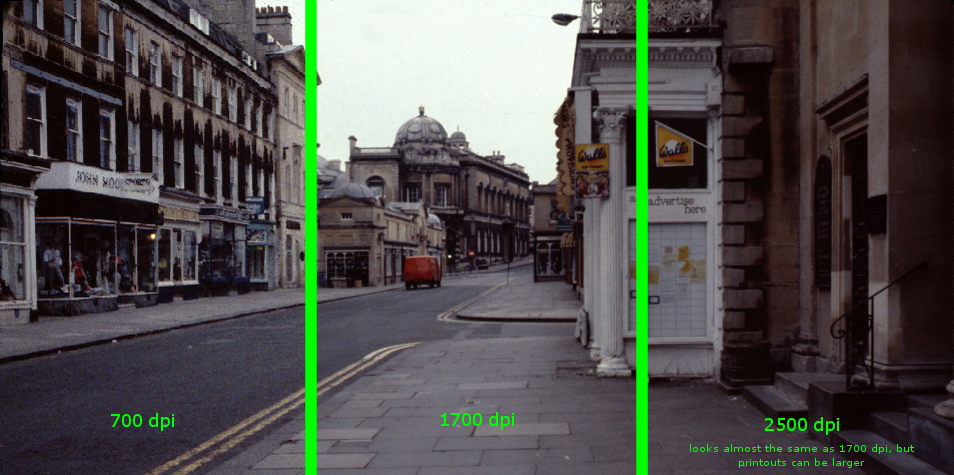
Slides/Negatives 700dpi, 1700dpi or 2500 dpi
The higher the dpi the better the resolution and the better copy/print quality.
For example, 1700 X 1700 dpi will give you better resolution or copy/print quality than 700 X 700 dpi, thus giving you better copy/print quality and better half tones.
We recommend:
700 dpi mainly for viewing on TV/Computer
1700 dpi for having a print remade (up to 7x10’)
2500 dpi if you would like a print remade (up to 14x21’)
Best Image Format For Scanning Photos
Two of the most common file types used for scanning old photos are JPEG (JPG) and TIFF. Each format comes with its own set of pros and cons that we will examine below. Deciding on the best format for your scanning project will again depend on what you intend to use the final scanned images for.
JPEG (.jpeg/.jpg)
JPEG is an acronym for the Joint Photographic Experts Group which designed the format in 1992. JPEG files are the most widely used digital image format across the internet thanks to their balance between file size and image quality. The vast majority of digital cameras and smartphones have JPEG files as the default image format.
Pros
· JPEG files can easily be shared and viewed on nearly all digital devices.
· Lossy compression allows for smaller file sizes, enabling you to save a larger number of files while using less hard drive space.
Cons
· Lossy compression can result in some detail loss
· Not ideal for images with lots of text or sharp lines/edges
TIFF (.tiff)
TIFF stands for Tag Image File Format. The format was first created by the Aldus Corporation in the 1980s for use in desktop publishing. TIFFs are great for storing high-quality images and are popular amongst graphic designers and professional photographers, thanks to their lossless form of file compression.
Pros
· Lossless compression means greater retention of detail, image data, and overall image quality
· Great for editing images down to precise details
Cons
· Extremely large file sizes compared to JPEGs, requiring more of your limited hard drive space
· Cannot always be opened on common digital devices; often requires special software.
Why we’re the best

SECURITY
Because we do all work on-site in our Birmingham studio, you never have to wonder about the whereabouts of your precious memories. Your tapes do not leave the premises of our secure video lab from the time you drop them off to the time you pick them up. One person is responsible for the work from start to finish and if you have questions, you’ll be able to get answers via face-to-face interaction.

CUSTOMER SERVICE
Our staff ensures every detail is addressed and all communication is done with honesty and respect. We strive to explain our processes with clarity and transparency in order to provide well-defined expectations. We always put the value of relationships with our clients ahead of the business value of the services we provide.